
Turn source material into a trip
AI extracts the itinerary from PDFs, images, and text into a draft you review. Trip-room summaries help turn a conversation into a handover, with the original messages available for checking.
MONITOURING / THE PLATFORM
All your tour data, connected. Your team, guides, partners, and travelers stay aligned while AI agents and automations take on monitoring and routine tasks.
Live monitoring & response
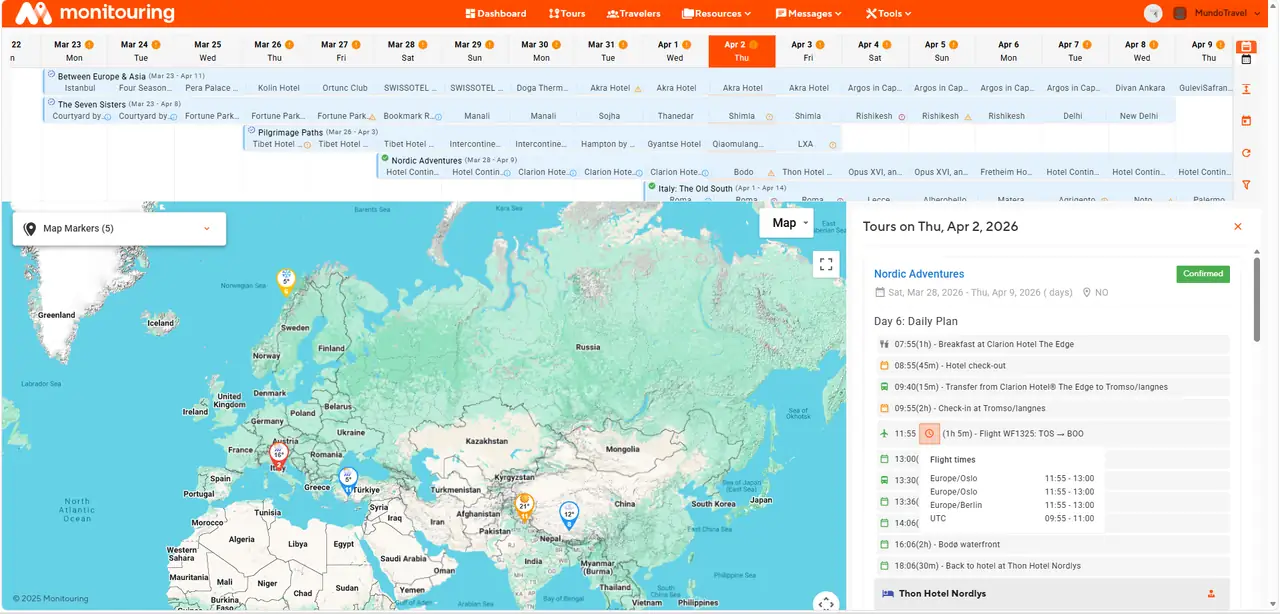
Follow flight, weather, and transfer checks for Confirmed and in-progress trips when the relevant trip details are entered. Staff-location monitoring applies only to segments where it is enabled.
A signal is useful when the team knows which trip it affects. Move from the timeline and map into the trip details and communication, with the itinerary close at hand when you need to assess a change or organize a response.
Financial visibility
See sales, payment states, payers, and outstanding balances across your trips. The financial view stays connected to the people and departures behind each sale.
Expected collections, payment reminders, and transaction history give each balance its context. Open a sale to see its payer, trip, line items, and payment schedule together.
Departure readiness
Prepare the departure across bookings, travelers, materials, operations, and DMC coordination. Keep confirmation status and operational tasks visible before the trip begins.
Supplier confirmations, traveler requirements, and departure-blocking tasks remain visible together. DMC responses stay attached to their services, including when a change calls for reconfirmation.
Traveler experience
Share the itinerary and relevant trip information through the traveler portal. Use private access links for traveler-specific information, and keep internal operations separate.
Travelers receive a trip page with the itinerary, images, and booking terms together. Private access brings relevant trip information to each participant; assigned guide profiles can follow the day or activity they cover.
Travelers & accommodation
Manage travelers and accommodation together. Keep room assignments and stay dates accessible to the team handling the departure.
Keep the roster, booking context, and accommodation allocations close together. Before departure, review unplaced travelers and open room spaces alongside the rest of your preparation requirements.
AI-assisted trip creation
Import PDFs, images, or itinerary text. Review the extracted trip details, flights, stays, and activities before creating your draft.
Keep the supplier program as the starting point. Check the extracted flights, stays, and activities together, correct anything that needs attention, then carry the reviewed draft into the itinerary editor.
Itinerary & resource planning
Lay out timed visits, transfers, meals, and activities. Reuse day templates and assign staff to a whole day or an individual segment.
Start with a reusable day template or build a route from individual segments. The schedule, accommodation, and staff assignments stay connected, so the team can work through the practical details behind each day plan.
AI agents & automations
A shared tour record gives automation the context it needs. Reduce repetitive setup, keep preparation moving, and monitor changing conditions while your people focus on decisions and service.
AI extracts the itinerary from PDFs, images, and text into a draft you review. Trip-room summaries help turn a conversation into a handover, with the original messages available for checking.
Automatic preparation checks, configured emails, and payment reminders support the departure workflow. Set reminder timing and message languages, and hold outgoing email for review when your team wants to approve it first.
Flight, weather, and enabled staff-location monitoring bring signals back to the trip and your team.
Watch the workflow
See how trip planning and day-to-day operations come together.
See it with your own operation in mind ↗MONITOURING